
Rename by content
Stop working file by file
Rename document batches from their contents with one consistent scheme. Organice previews every proposed name before changing files and preserves extensions.
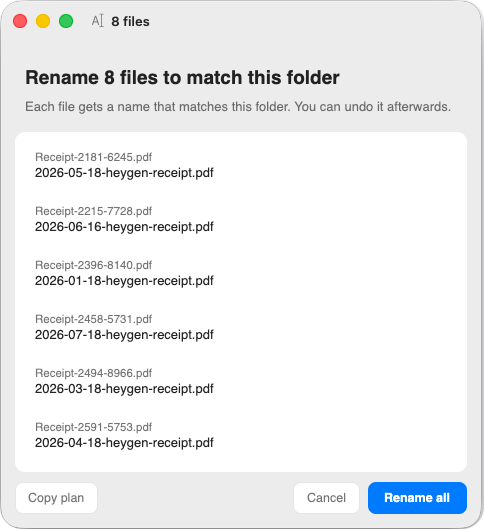
Review every name before applying
Select the batch. Review the scheme. Apply it when ready.
How it works
- Select
Choose the documents that belong together in Finder.
- Review
See every current name beside its proposed replacement.
- Apply
Approve the set, or cancel and leave every name untouched.
What stays clear
- The set is visible
- Check consistency across every selected file at once.
- Extensions stay fixed
- Organice changes the name, never the file type.
- Cancel means cancel
- No rename happens until you explicitly apply the plan.
How content-aware naming works
Base extracts common document fields locally, then formats dates, vendors, document types, and identifiers into one deterministic scheme for the selection.
Results depend on readable source text. The complete proposal keeps uncertain or missing fields visible before you decide.
Base renames locally on your Mac
Base creates the batch proposal on your Mac, without an AI account or cloud service.
- Input
- Only the files you select are considered.
- Proposal
- The complete naming plan appears before any change.
- Control
- You decide whether to apply the proposal.