
Smart Copy
Copy what’s inside. Skip opening it
Use Base for one document or Pro for a whole selection. Smart Copy gathers readable content on your Mac, preserves useful structure, and makes it ready to paste without uploading the source files.
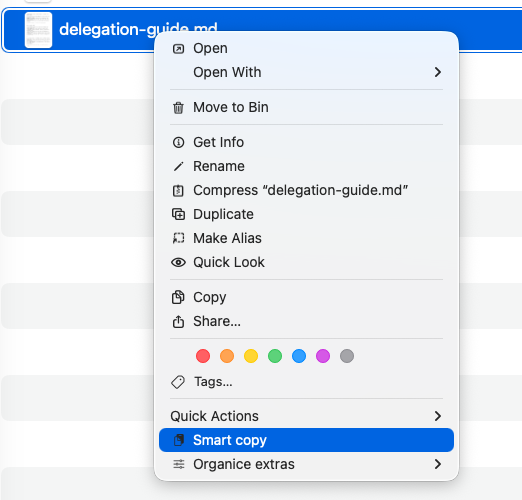
One file or the whole pile
Get the content without opening the file. With Pro, do the same for many files at once.
How it works
- Select
Choose one document in Base, or several documents in Pro.
- Copy
Smart Copy reads each file locally and preserves useful structure.
- Paste
Continue in Notes, Mail, an editor, or the assistant you already use.
What stays clear
- Base when one file is enough
- Get the content from one document without opening it.
- Pro for a whole selection
- Gather many documents into one organized result, with every file clearly separated.
- No silent gaps
- If a file cannot be read, its name stays in the right place in the result.
Formats and limits
Smart Copy supports PDFs, scans, images, Word, OpenDocument text and spreadsheets, PowerPoint, Pages, Keynote, Numbers, common spreadsheet formats, plain text, and Markdown.
Text layers are read directly. Scans and images use on-device OCR. Results depend on the source, so a clean text PDF preserves more structure than a blurred photograph or free-form layout.
Use Smart Copy with an AI assistant
Smart Copy prepares clean text and Markdown before an assistant sees it. The source file stays in Finder, with no file upload required. Only text you choose to paste reaches the destination.
Token use varies by provider, model, and document. Prepared Markdown can remove file-processing overhead, but Organice does not promise a fixed token reduction. The destination’s privacy terms apply.
One document or the whole selection
Base handles one document. Pro gathers a whole selection into one structured result with a numbered contents list and a section for every file. Both work without AI or a cloud service.
- Base
- Get the content from one document without opening the file.
- Pro
- Get the content from many documents at once.
- Clarity
- Unreadable files are named in the result and never disappear silently.
- Result
- Ready on the clipboard. If it grows too large, Organice saves it beside the files instead.
- Network
- Smart Copy makes no network request.